
AI Features

Video

Image to VideoText to VideoReference to VideoFirst & Last Frame

Image

Image EditingImage to ImageText to Image
AI Models
Veo 3.1 FastKling 3.0Seedance 2 FastHailuo 02 StandardWan 3.0RunwayPixVerse V6Grok ImagineNano Banana 2GPT Image 2Seedream 5 FlashFLUX 2 ProIdeogram V3Qwen3
All Models
AI Tools
Motion TransferTransfer motion from a reference video to a character image.Virtual Outfit Try-OnAn editable reference-image workflow for clothing visualization. Provide the person in the first image and the garment in the second image.Interior RestylingAn editable image edit workflow for room redecoration. Use the first image for your room layout, and optionally upload a second image as a decor/style reference.Natural Portrait RetouchAn editable single-image workflow for subtle portrait enhancement.Video RecastSwap selected people using character images while preserving original motion and scene.Video SwapReplace a person in a video using a photo.Product VideoGenerate a product video using a reference photo and a prompt describing the desired result.Product PosterCreate a product poster using a reference photo and a prompt describing the desired design.
StudioAll Tools
Pricing
Resources

Creator Resources

Video TemplatesExamplesFAQAPI

Company & Account

AboutPartnershipsContactSign InAccount
AI Features

Video

Image to VideoText to VideoReference to VideoFirst & Last Frame

Image

Image EditingImage to ImageText to Image
AI Models
Veo 3.1 FastKling 3.0Seedance 2 FastHailuo 02 StandardWan 3.0RunwayPixVerse V6Grok ImagineNano Banana 2GPT Image 2Seedream 5 FlashFLUX 2 ProIdeogram V3Qwen3
All Models
AI Tools
Motion TransferTransfer motion from a reference video to a character image.Virtual Outfit Try-OnAn editable reference-image workflow for clothing visualization. Provide the person in the first image and the garment in the second image.Interior RestylingAn editable image edit workflow for room redecoration. Use the first image for your room layout, and optionally upload a second image as a decor/style reference.Natural Portrait RetouchAn editable single-image workflow for subtle portrait enhancement.Video RecastSwap selected people using character images while preserving original motion and scene.Video SwapReplace a person in a video using a photo.Product VideoGenerate a product video using a reference photo and a prompt describing the desired result.Product PosterCreate a product poster using a reference photo and a prompt describing the desired design.
StudioAll Tools
Pricing
Resources

Creator Resources

Video TemplatesExamplesFAQAPI

Company & Account

AboutPartnershipsContactSign InAccount
English简体中文
Create now

Wan 3.0 AI Video Generator

Wan 3.0 is Alibaba’s multimodal AI video model for longer stories, consistent characters and scenes, and precise video edits. Create clips up to 30 seconds in 1080p on GetReelMaker, with control over references, camera direction, and sound.

Video generation

Wan 3.0 VideoText / image
Parameters
Night drift · Visual reference

What you can create with Wan 3.0

Build a scene from multimodal references

Use images to establish the look, video to demonstrate an action, or audio to set the rhythm. A storyboard, creative brief, or public web page can supply the background and direction for the scene.

Tell a story in up to 30 seconds

Give a scene time to establish the setting, develop an action, move between story beats, and reach a conclusion. Choose the length yourself or let Wan 3.0 select it. Any reference footage counts toward the 30-second total.

Keep characters and environments consistent

Reference materials help preserve a character’s appearance, wardrobe, props, and sound cues as the action changes. They can also guide continuity in the layout of the scene and the positions of subjects relative to one another.

Edit or extend an existing video

Provide the original clip as a video reference. Describe which subject, background, lighting, or style to change and which details to preserve. To extend the clip, describe what should happen after its final shot.

Generate dialogue, music, and sound with video

Use the audio setting to generate sound alongside the picture. Describe the voice, regional speech, musical rhythm, or ambient sound and how it should follow the performance. Audio references can guide the mood or pacing.

Direct cinematic visuals and motion

Specify the lighting, color, framing, and camera movement, down to the timing of a gesture or how an object responds on impact. Direct the performance and describe how materials such as fabric, glass, or metal should look and move.

Wan 3.0 inputs and output specifications

The GetReelMaker creator connects to the standard Wan 3.0 Video model via KIE. Use public URLs for image, video, audio, document and web page inputs.

Text to video
Describe characters, actions, lighting, camera movement, and pacing in English or Chinese. KIE accepts prompts of up to 20,000 characters.
Image to video and keyframes
Use an opening image to set the composition and optionally specify the ending view. This mode uses the frame images without additional reference media, files, or web links.
Multimodal references
Use images to guide wardrobe and materials, or video to show how a subject or camera should move. Add up to 10 images, 5 video clips, and 5 audio clips. Each video or audio set can total up to 15 seconds. Identify the sources in the prompt as Image1, Video1, or Audio1.
Documents and web pages
Use one supported document or one publicly accessible web page to give the model additional context.
Duration, resolution, and audio
Choose 480p, 720p, or 1080p and whether to include generated sound. With no input video, request 2–30 seconds or use automatic duration. With input video, the combined input and output length cannot exceed 30 seconds.
Editing and extension
Provide an existing clip as a video reference and describe the edit or the next action. KIE counts the reference and output video durations when billing by the second.
  • KIE Wan 3.0 model overview
  • KIE Wan 3.0 Video API documentation

How to create videos with Wan 3.0 on GetReelMaker

Turn a shot idea into a video in three steps.

  1. ModelWan 3.0

    A low tracking shot follows a white race car drifting around a wet city corner at night. Streetlights reflect off the asphalt as tire smoke trails behind.

    Step 1

    Choose a creation mode

    Write a prompt in the creator above. For keyframes, media references, a document, or a web page, paste the public URL for each input you want to use.

  2. Input
    Prompt or references
    Duration
    2–30s or auto
    Resolution
    480p, 720p, 1080p
    Aspect ratio
    Adaptive, landscape, portrait or square
    Audio
    On or off
    Step 2

    Review the output settings

    Set the duration, resolution, aspect ratio and audio. Get a credit estimate before submitting.
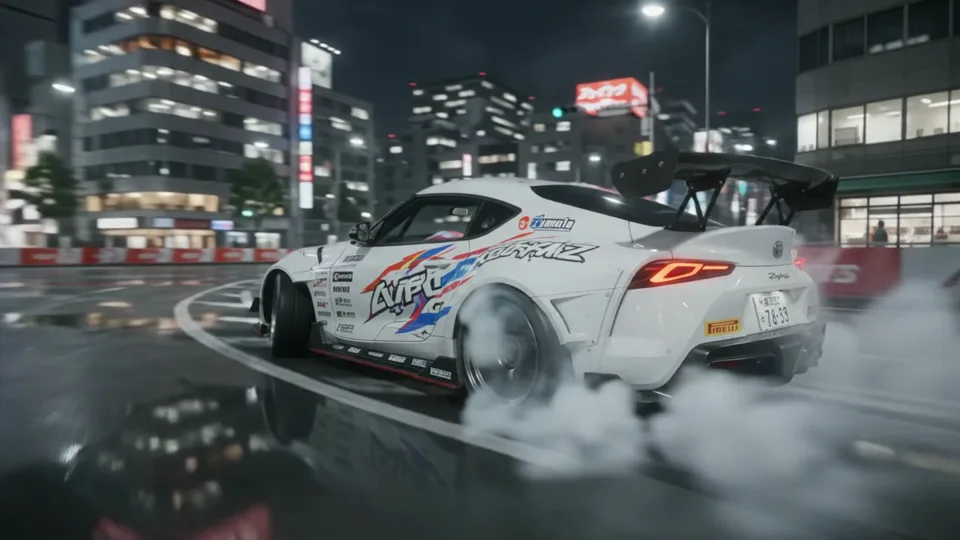
  3. Night drift
    Step 3

    Generate and review

    Sign in to generate and preview your clip. Adjust one detail at a time if you want to compare takes.

How to get the best results with Wan 3.0

  • Start with one subject

    Pick the one object or person the viewer should notice first.

  • Name the camera move

    Use a concrete direction such as overhead follow, push-in, or a fixed shot.

  • Describe the lighting

    Give the scene a light source and a direction, such as late sun from the right.

  • Match the duration to the action

    Use a short duration for a single movement. Allow more time for actions or transitions that need to unfold.

  • Change one detail at a time

    Try two versions with the same subject and a different angle to compare the shots.

Wan 3.0

Frequently Asked Questions

What is Wan 3.0?

Wan 3.0 is Alibaba’s multimodal video generation model. KIE’s standard Wan 3.0 Video model can create new clips from text or images, use media references, and edit or extend existing footage.

Can Wan 3.0 generate 30-second or 1080p videos?

KIE supports 2–30 seconds and resolutions up to 1080p. A request with reference video must fit the input and output into 30 seconds total.

Does Wan 3.0 generate video with audio?

KIE’s Wan 3.0 Video API can generate sound with the picture and accepts audio references in reference mode. Use the audio switch to choose whether to include sound.

Can Wan 3.0 edit or extend an existing video?

KIE supports editing or continuing footage through video references. Supply the clip and describe the intended change or what should happen next.

Does Wan 3.0 support image-to-video and first and last frames?

KIE supports a first image to anchor the shot and an optional last image to guide the ending. Reference media, files, and web links are separate from the keyframe workflow.

Which inputs does the GetReelMaker creator on this page accept?

Choose text to video, first and last frames, media references, a document or a public web page. Provide publicly accessible URLs for reference inputs.

Do I need an account to generate?

Yes. Sign in and have enough credits to submit a generation. Request a credit estimate before submitting.

Explore all models

Make your next shot with Wan 3.0

Try Wan 3.0

Turn ideas and images into viral short videos.

Terms of ServicePrivacy Policy

© 2026 GetReelMaker. All rights reserved.

简体中文

AI Tools

  • Image to Video
  • Text to Video
  • Reference to Video
  • First & Last Frame
  • Image Editing
  • Image to Image
  • Text to Image
  • Motion Transfer
  • Virtual Outfit Try-On
  • Interior Restyling
  • Natural Portrait Retouch
  • Video Recast
  • Video Swap
  • Product Video
  • Product Poster

AI Video Models

  • Kling 4.0
  • Kling 4.0 Flash
  • Seedance 2.5
  • Kling 3.0 Omni
  • Gemini Omni 1.2 Flash
  • MiniMax H3
  • HappyHorse 1.1
  • Vidu Q4
  • Veo 3.1 Fast
  • Kling 3.0
  • Seedance 2 Fast
  • Hailuo 02 Standard
  • Wan 3.0
  • Runway
  • PixVerse V6
  • Grok Imagine

AI Image Models

  • Nano Banana 2.1
  • Nano Banana Pro
  • GPT Image 2.6 Flare
  • Seedream 5 Pro
  • Grok Imagine Image 2.0
  • FLUX 3 Klein
  • Z Image Turbo
  • Nano Banana 2
  • GPT Image 2
  • Seedream 5 Flash
  • FLUX 2 Pro
  • Ideogram V3
  • Qwen3

Video Templates

  • AI Editorial Portrait Video
  • AI Character Motion Video
  • AI Travel Story Video
  • AI Coastal Drive Video
  • AI Candlelight Video
  • AI Orbital Station Video
  • AI Miniature Character Video
  • AI City Skate Video
  • AI Neon Walk Video
  • AI Night Drive Video
  • AI Cloud Palace Video
  • AI Product Demo Video
  • Solo Beat Dance
  • Aura Lead Dance
  • Soccer Ball Skills
  • AI Dog Dance Crew
  • Kung Fu Cat
  • Two-Photo Reunion Hug
  • Old Photo Animation
  • First-Person Product Unboxing
  • Fisheye Street Video
  • Prop-Wipe Outfit Change
  • Fancy Café POV
  • Glass Fruit ASMR
  • Synchronized Duet Dance
  • Three-Person Join-In Dance
  • Sliding Footwork Dance
  • Baby Dance Loop
  • Surprised Duo Reaction
  • Pet Clap Reaction Loop
  • Exit on Cue
  • Two-Mic Duet
  • Talking Pet
  • Portrait Lip Sync
  • Age Progression
  • Earth Zoom
  • Bullet-Time Orbit
  • Shadow Clones
  • Palm Mini Me
  • Kung Fu Sparring
  • Knee-Slide Celebration
  • 360-Degree Product Display
  • Hip Sway Loop
  • Pointing Dance
  • Classroom Dance
  • Stop-and-Go Dance
  • Mirror Duet Dance
  • Street Dance Formation
  • Robot Beat Dance
  • Awkward Calm Reaction
  • Absurd Morning Routine
  • Holding Back Laughter
  • Mop Reveal Gag
  • Stadium Kiss Cam
  • Boxing Dog
  • Singing Pet
  • Pet Memorial Reunion
  • Living Instant Photo
  • Meet Your Younger Self
  • Ceiling Fan Transition
  • Flat Image to 3D
  • Live Action to Animation
  • Action Figure Display
  • Sports Tunnel Walkout
  • Basketball Dunk
  • Champion Belt Reveal
  • Floating Product Close-Up
  • Keyboard ASMR
  • Crowd Lead Dance
  • Window Peeper Dance
  • Solo Pop Choreography
  • Skeleton Group Dance
  • Cruise Deck Duet
  • Food Toss Reaction
  • Head-Shake Reaction Loop
  • Money Flex Props
  • Monster Shuffle
  • Fruit Drama
  • Magic Outfit Transformation
  • Game Character Introduction
  • POV Sparring
  • Zero-Gravity Jump
  • Mecha Duel
  • Fantasy Escape
  • Basketball Crossover
  • Stadium Fan Interview
  • Sports Broadcast Cut-In
  • Giant Product Ad
  • Stain Removal Before and After
  • Water Ripple Product Display
  • Pet Paw ASMR
  • Christmas Greeting Video
  • Room Makeover
  • Bicep Heart Reveal
  • Shoulder Carry Reveal
  • Makeup Transformation
  • Soft Squish Rebound
  • Chair Spin Reveal
  • Desk Concert
  • Knight Cat
  • Dishwashing Dog
  • Voxel World Parkour
  • Mermaid Reveal
  • Football Trophy Lift
  • Night Baseball Hit
  • Candy Crack ASMR
  • Cooking Sizzle ASMR
  • 3D Billboard Product Reveal

Resources

  • Studio
  • Pricing
  • Frequently Asked Questions
  • API Docs
  • API Keys
  • About Us
  • Partnerships
  • Contact